
How-toNo code needed
Checklist
Give a care team member or patient a list of tasks to tick off inside a care flow, with a separate checklist per stakeholder if needed.
A checklist makes sure something isn't forgotten: administrative steps, clinical checks, or a plain reminder like what to pack before surgery.
Add a checklist
- Double-click the step that will hold it.
- Click Add action and choose Checklist.
- Name the checklist action.
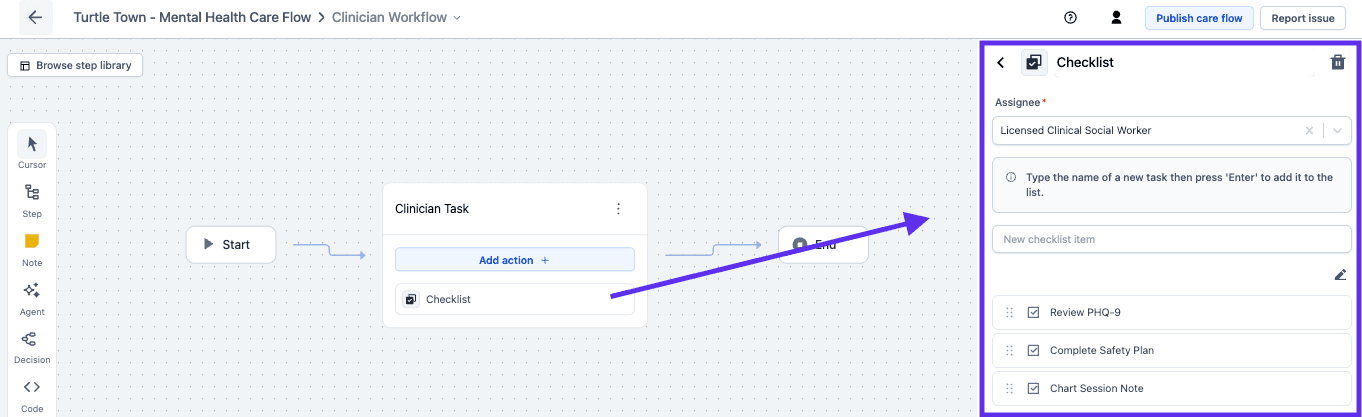
Each checklist has one stakeholder and its own items
- Choose the stakeholder responsible for working through it.
- Add the checklist items.
- Drag and drop to reorder them.
- Click Edit to delete items.
One step can hold several checklists
Each gets its own stakeholder and tasks, so a nurse and a patient with work at the same moment get two checklists rather than one shared list with mixed ownership.
Next steps
Checklists complete the set of actions a step can hold. The rest of this section covers documenting a care flow and taking it live.