
Duplicate a care flow
Copy an existing care flow instead of rebuilding it, and know what the copy does not bring with it.
A new care flow is often close to an existing one but different enough to justify its own flow. Duplicate the original and edit from there rather than rebuilding it.
Duplicate it
- Go to the Care flow overview page.
- Find the care flow to copy.
- Click the three dots at the end of its row.
- Click Duplicate, then confirm with Duplicate care flow.
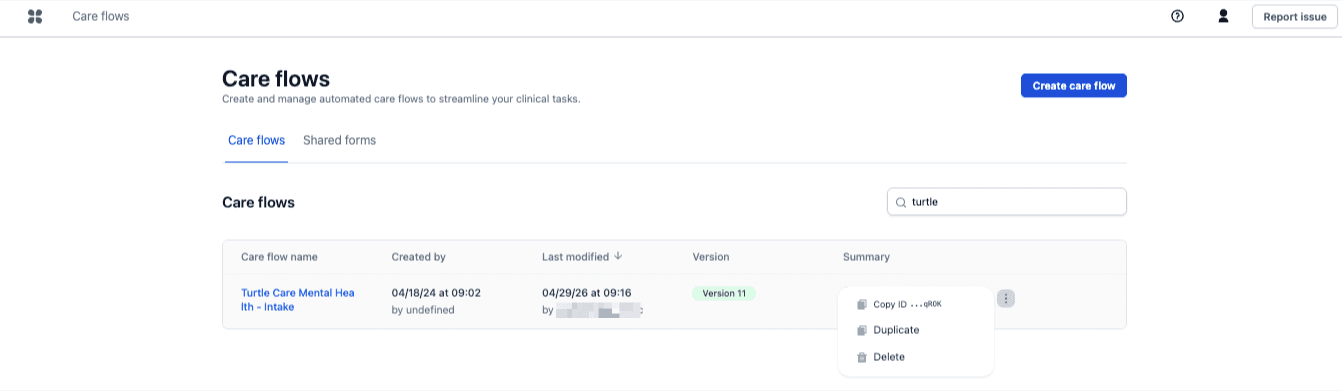
Large care flows can take a minute or more, and the overview page stays usable while the copy runs.
Check the sharing link and anything pointing outward
Everything else is copied exactly.
- The Hosted Pages sharing link is not copied. Each care flow needs its own link, so generate a new one for the duplicate. See Embed & host.
- Check anything that points outward: webhook endpoints, API call actions, and any integration configured on the original. A duplicated care flow keeps the original's webhook URL, so both care flows post to the same endpoint until it's changed.
Next steps
The duplicate starts as a draft, like any new flow. When it's ready, publish it from Settings.
Add steps to your step library
Save a configured step to the step library to reuse it across tracks in the same care flow instead of maintaining duplicate copies.
Track looping
Model repeating care directly by looping a track, with a maximum number of iterations and an optional condition that ends the loop early.