
Track looping
Model repeating care directly by looping a track, with a maximum number of iterations and an optional condition that ends the loop early.
Follow-ups, reassessments and ongoing monitoring repeat until something changes. Track looping models that directly, instead of copying a track several times and hoping the count is right.
Add a loop to a track
- Open the care flow and go to the Build tab.
- Expand the track to loop.
- Click Edit track looping.
- Set the loop condition:
- a maximum number of iterations
- an optional stop condition for ending the loop early
- Save.
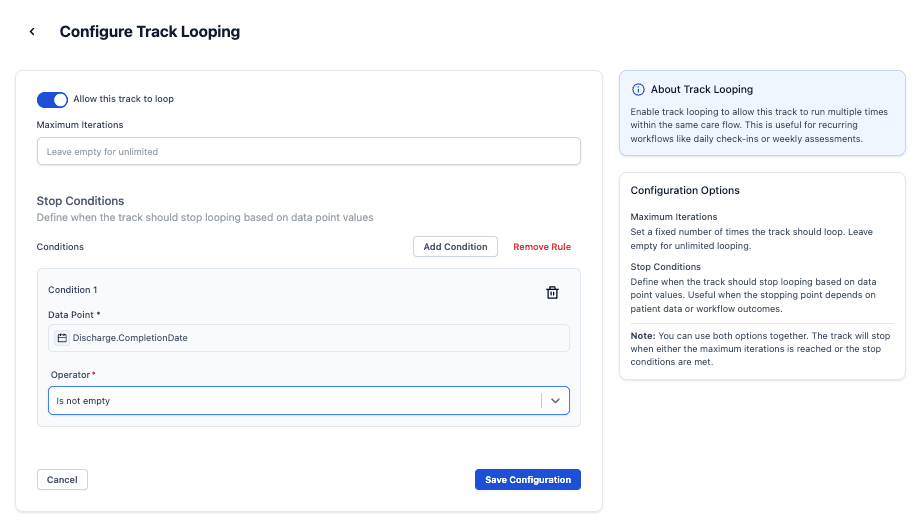
A maximum and a stop condition can both be set. The track stops at whichever is reached first.
A maximum number of iterations is required
Set a maximum; when the track reaches it, looping stops.
The maximum keeps loops predictable, and prevents a typo from leaving a care flow running forever against a real patient.
For a loop that should run "until" something rather than a fixed number of times, set the maximum high, say 100, which behaves like an open-ended loop while keeping a safe upper bound.
A stop condition ends the loop early
A stop condition lets the track leave the loop when something is true. Conditions are based on data points and use the same conditional logic as the rest of the care flow, so a "patient reported no symptoms" answer can end a monitoring loop.
Without a stop condition, the track loops until it reaches the maximum.
Next steps
Next: The Timer component to control the delay between iterations.