
The Timer component
Pause a care flow for a set duration or until a specific date, with the timing visible on the canvas and skippable while testing.
A Timer is a node on the canvas that pauses a care flow, either for an amount of time or until a date. It's how actions get spaced out: wait three days, then send the follow-up.
Prefer a Timer over a timing constraint on a transition
Timing constraints on a transition still do the job, but a Timer is the better choice:
- Timers appear as nodes on the canvas and in the activity feed, so the timing is on the design instead of buried in a transition's settings.
- A Timer can be skipped manually from the activity feed, which moves a test patient forward without waiting three real days.
- A Timer sets the hour of day the next step activates.
- A Timer respects the patient's timezone automatically, so "9am" means 9am where the patient is, and a reminder built in Brussels doesn't arrive at 3am for a patient in California.
A Timer waits either a duration or a date
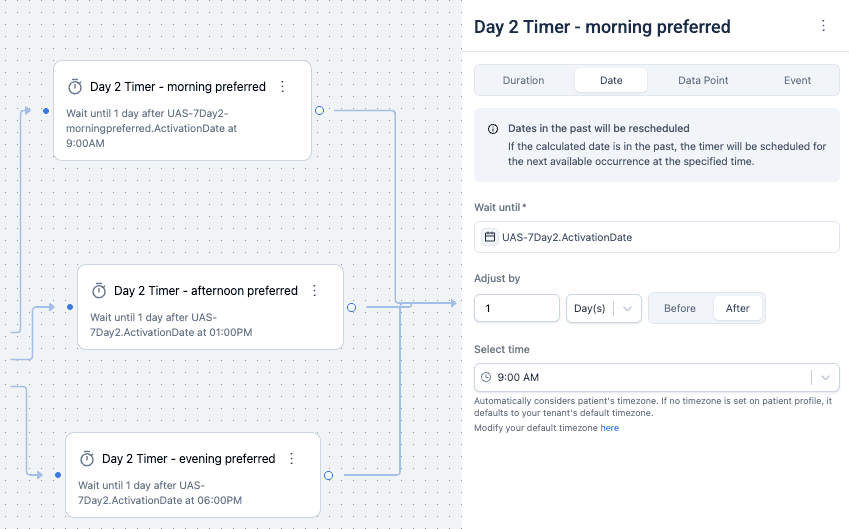
The time of day uses the patient's timezone where the profile has one, and the organization's default where it doesn't. A calculated date already in the past is rescheduled to the next occurrence.
- Duration waits for an amount of time. For example, five days after the previous step.
- Date waits until a specific date, which can come from a data point. For example, the surgery date collected at intake.
Next steps
Next: Decision component for choosing a path rather than waiting.
Add a calculation
Turn data collected in a care flow into a score, using a validated calculation from the Awell Score suite, then configure its inputs.
Decision component
Express conditional logic as a readable decision table instead of chains of if-else transitions, with a catch-all rule for anything unmatched and a test run in Studio before it reaches a patient.