
Link to an activity from email or SMS
Put a link to a pending activity into an email or text message, so a stakeholder can act straight from the message.
Use this to reach a stakeholder by email or text message and let them complete a pending activity straight from the message, rather than asking them to log in somewhere.
Not to be confused with embedding Hosted Pages, which puts Hosted Pages inside a host app rather than a link inside a message.
Before starting
Activate one of the communication extensions, so the Send Email or Send SMS actions are available. See Integrate with extensions.
Add the link
- Double-click the step that sends the email or text message.
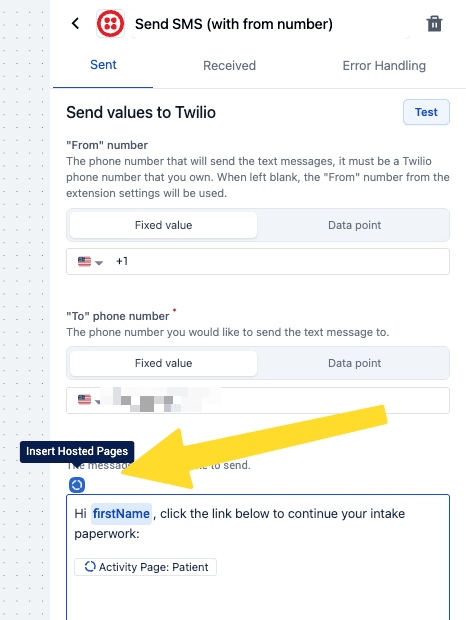
- Add a Send Email or Send SMS action.
- Add the activity page link to the dynamic template data for email, or directly into the body of the text message.
A dynamic email template can render the link as a "click here" button, so it reads as the call to action rather than a URL in the middle of a paragraph.
Next steps
- Send email notifications for configuring email.
- Care flow design with Hosted Pages for why a secondary channel is worth having.
Care flow design with Hosted Pages
How to design a care flow whose activities are completed on Hosted Pages, and why system activities in the wrong place make a patient wait.
Tracking and attribution
Attribute Hosted Pages sessions to campaigns, partners and traffic sources using UTM or custom parameters, then query the results in BigQuery.