
Create patients
Create a patient manually in Awell Care or through the Orchestration API, since a care flow cannot start without one.
Care flows only run for patients, so a patient record is a prerequisite.
- Manual creation through the Awell Care interface.
- Integrated creation through the Orchestration API, when another system should create patients.
Create a patient manually
- Go to the Patient list in Awell Care.
- Click Create patient in the top right.
- Fill in the mandatory fields: first name, last name, date of birth, sex, and email.
- Click Create patient at the bottom.
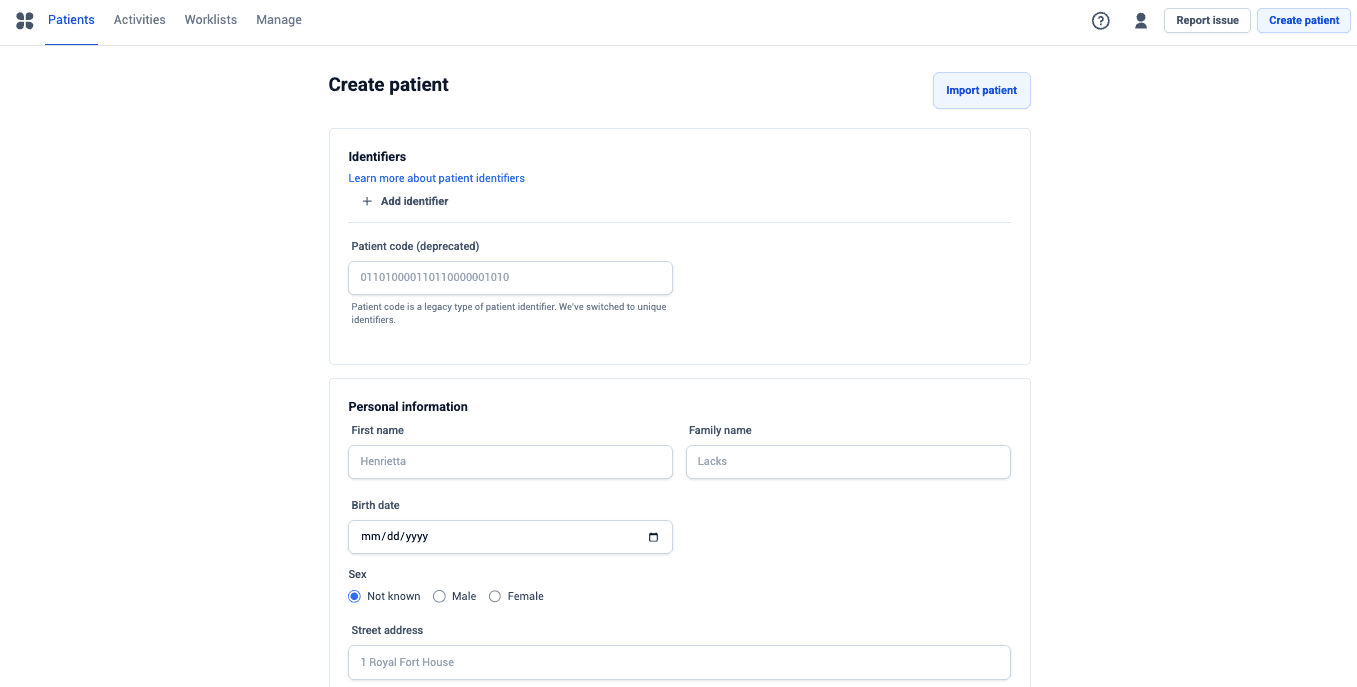
Identifiers sit above the personal details, so an external identifier can be attached as the patient is created rather than added later.
Awell Care then opens the new patient's profile, ready to start a care flow.
Any Send email action in a care flow uses the email address, so a missing or wrong address means those messages go nowhere.
Create patients through the API
Use the createPatient mutation in the Orchestration API. See
Patients in the API reference.
This is the right route when patients originate in another system, such as an electronic medical record, so nobody retypes them.
Anonymous patients are also possible, which suits an intake form filled in before the person's identity is known.
Next steps
Next: Start a care flow for the new patient.
How you work in Awell Care
The views Awell Care provides out of the box, from patient lists to task lists to the activity feed, and which one fits which way of working.
Start a care flow
Enroll a patient in a published care flow from Awell Care or through the API, including the baseline data the flow may ask for.