
Start a care flow
Enroll a patient in a published care flow from Awell Care or through the API, including the baseline data the flow may ask for.
Starting a care flow enrolls a patient in it. From that moment Awell orchestrates their activities.
A patient record has to exist first. See Create patients.
Start a care flow manually
- Go to the Patient list in Awell Care.
- Select the patient.
- Click Start care flow in the quick-access links on the left of the patient profile.
- Choose the care flow from the list of published care flows.
- If the flow asks for baseline data points, fill them in.
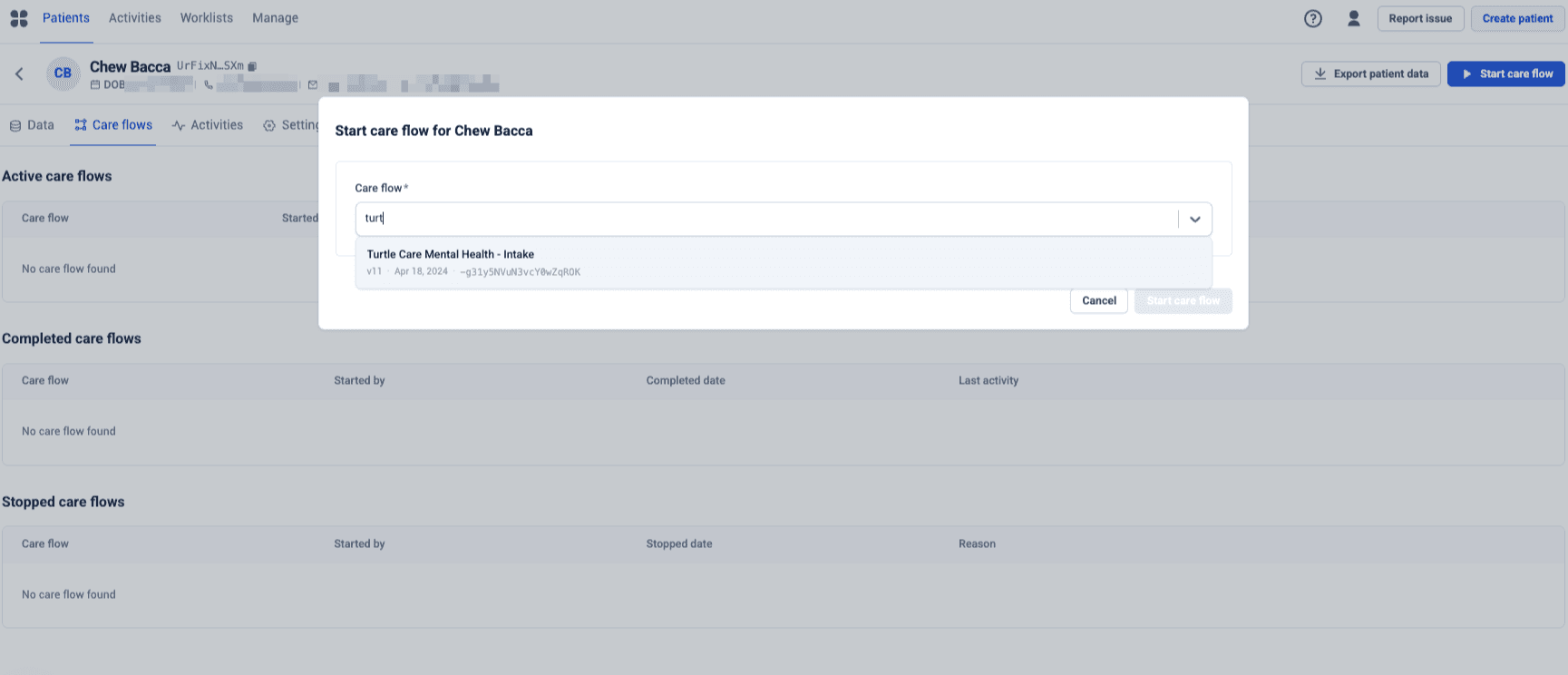
The list shows the version and the date it was published, so it is clear which one a patient is being enrolled in.
Only published care flows appear in that list. A missing care flow hasn't been published yet. See Publish and set your care flow live.
Baseline data is worth filling in properly
Baseline data points are the values the flow needs but doesn't collect itself, like a surgery date. Mandatory ones block the start; optional ones don't. But if the flow's logic reads an optional value that is missing, the flow stalls at that logic without reporting an error. Fill in whatever is available.
Start a care flow through the API
Use the startPathway mutation. See
Care flows in the API reference.
This is how another system enrolls patients automatically, for example when a referral is accepted.
Next steps
Next: Review and interact with care flow activities to see what the flow generated.