
Build forms with Shelly
Describe an assessment in plain language and have Shelly draft the questions, or upload an existing form and have it recreated.
Shelly sits inside Awell's form builder: describe an assessment in plain language and it drafts the questions.
Shelly drafts a new form or recreates an existing one
Shelly produces a first draft to refine, which is faster than composing a form question by question in an empty builder.
For an assessment that already exists, upload it and Shelly recreates it as an Awell form.
Prompt Shelly while the form is open
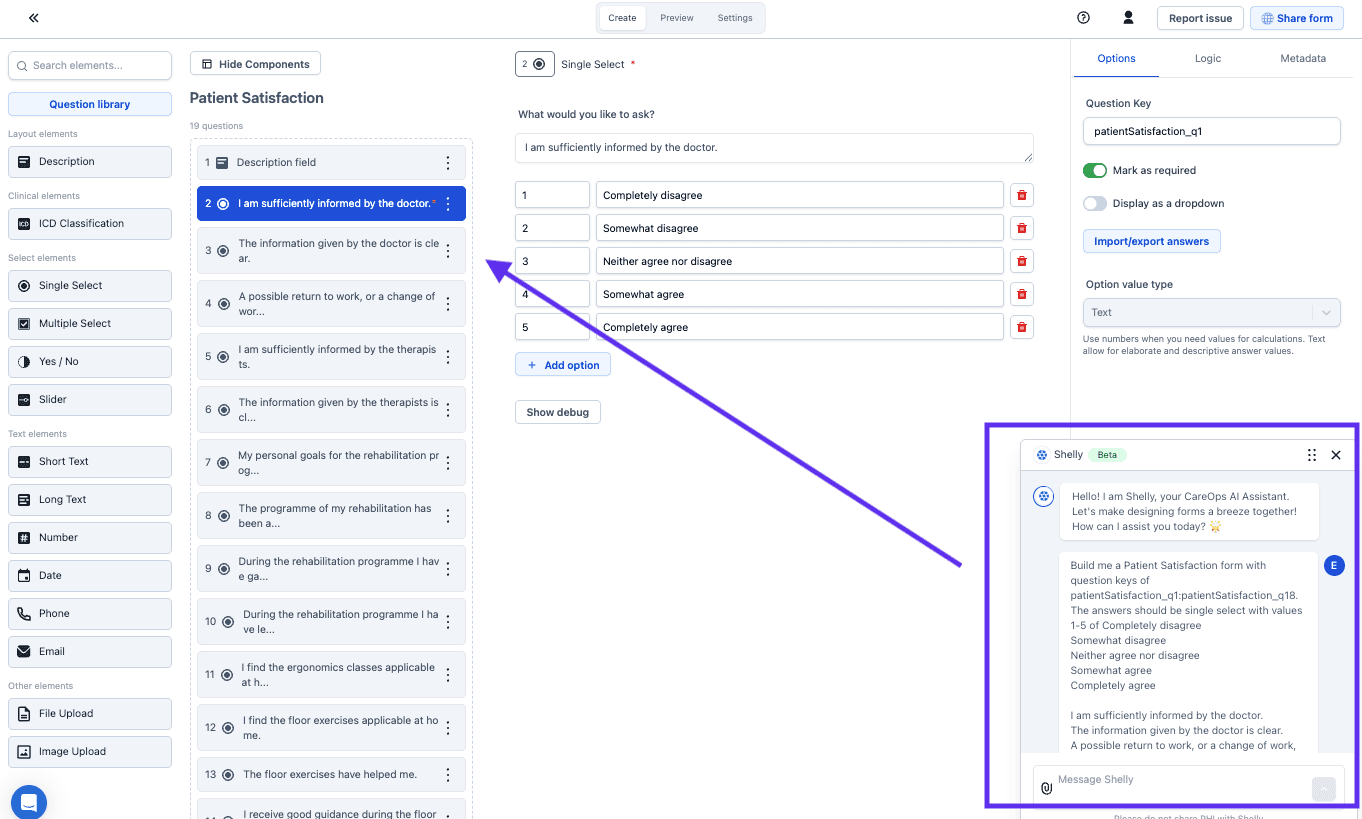
Describe the workflow or assessment while designing a form, and Shelly creates or edits the questions.
Detail in the prompt improves the draft
- Give context. Detail about the use case produces a more usable draft.
- Name the question types. An answer that has to drive conditional logic can't be a date or free text, so say so up front.
- Iterate. The first output is a draft, not a finished form.
Every drafted form needs a human review before publishing
Read every question before it reaches a patient, and check what a generator can't know: whether the wording matches the protocol, whether an instrument has to stay verbatim to remain valid, and whether the answer options match what the logic downstream expects.
Don't generate a validated questionnaire. Import it from the library instead, so the wording and scoring stay intact.
Next steps
Next: Encode questions and answer options, which a generated form still needs.
Build a form
Create a form's questions in the form builder, from the validated-questionnaire library or from scratch, and understand what the data feeds later.
Edit a form's questions
Change, reorder, or delete questions and answer options in an existing form, after checking every care flow the form is used in.